
Meraki WPN Context
The unit of EasyPSK inside an Organization: one Meraki dashboard connection, one SSID, and the Wireless Personal Networks that live on it.
A Meraki WPN Context is an instance of EasyPSK inside an Organization, for the Meraki WPN (Dashboard API) delivery. The primary delivery, EasyPSK via RADIUS, is created as an EntryPoint Context instead. A Meraki WPN Context holds one connection to a Cisco Meraki dashboard, one SSID, and the Wireless Personal Networks that scope residents into per-unit Wi-Fi bubbles.
Where it fits
Section titled “Where it fits”Organization└── Contexts ├── Meraki WPN Context ← this page (EasyPSK · Meraki WPN) ├── Sign-In Context ├── EntryPoint Context └── ISE Device Management ContextAn Organization can have more than one Meraki WPN Context — for example, one per building when a campus has separate Meraki networks and separate SSIDs per building.
What lives inside a Context
Section titled “What lives inside a Context”- The Meraki integration — API key, Meraki organization, the network or template the Context targets, the SSID, and the Group Policy strategy.
- Wireless Personal Networks — one per apartment / unit / bubble. Each WPN holds one Meraki Identity PSK (per associated network).
- Self-Service Users — members of each WPN: residents who share the key. Every Self-Service User is a User (default); one of them per WPN is typically promoted to Group Administrator. Each can also carry an optional phone number as a contact detail.
- Connected devices — the clients actually joined to each WPN’s PSK, read from the Meraki dashboard in near-real-time.
- Configuration — Context name, description, PSK defaults, and the Meraki integration summary.
- Administration — the usual Audit Log, Webhooks, Administrators, and License entries shared with every Service.
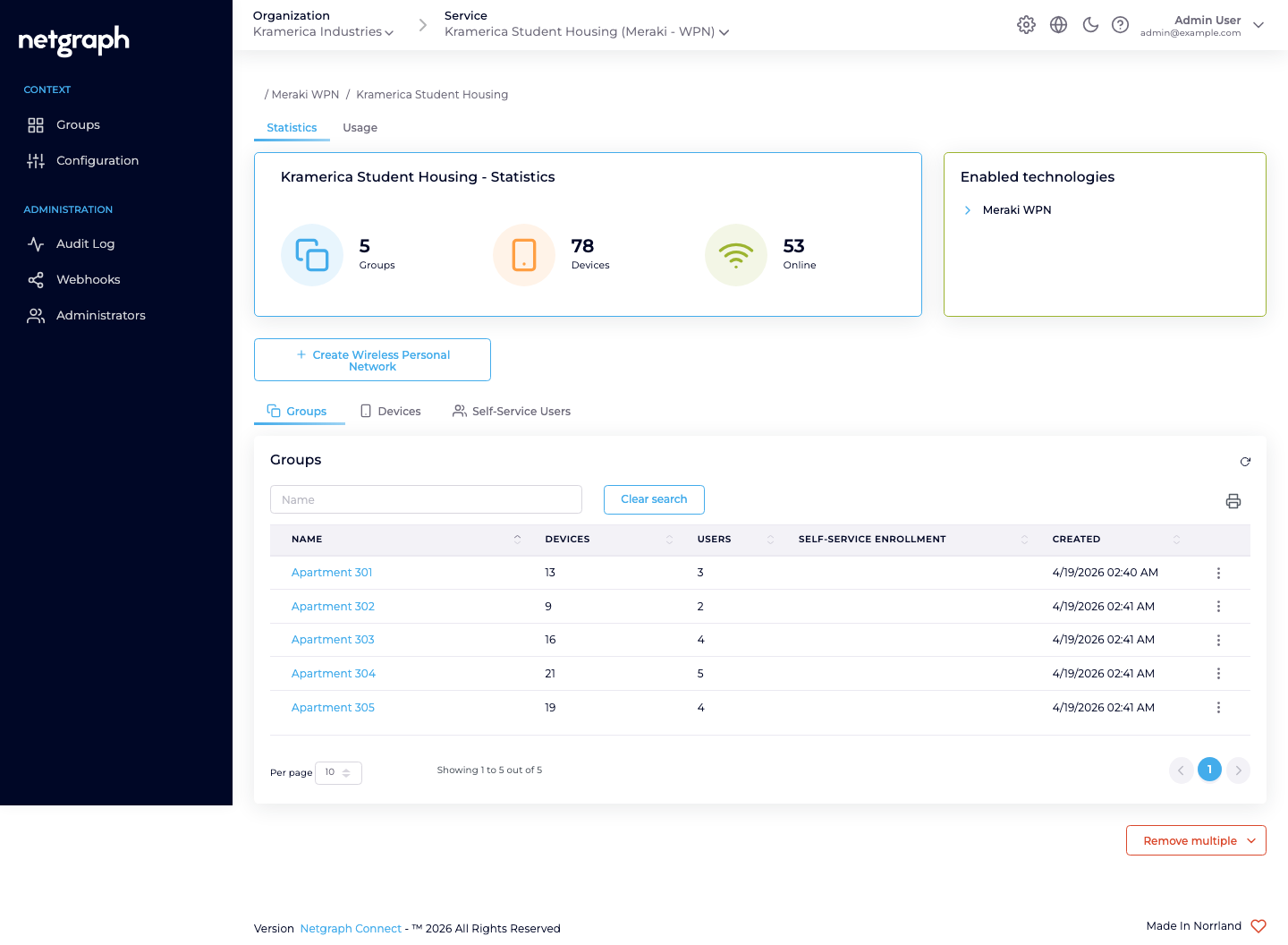
Two more actions sit on the overview alongside Create Wireless Personal Network: Batch Group Sync and Export Groups. They manage all of the Context’s WPNs and their residents from a single CSV file, which is the fastest way to onboard or turn over a whole building. See Batch Group Sync.
Meraki-side concepts the Context reflects
Section titled “Meraki-side concepts the Context reflects”The Context mirrors Meraki’s own object hierarchy:
- A Meraki organization is the top-level tenant of your Meraki dashboard. A Context connects to exactly one.
- A Meraki network is a set of devices (for EasyPSK: MR-series access points) sharing configuration.
- A configuration template can be shared across many Meraki networks. For multi-building deployments, a Meraki network template is often simpler than maintaining per-network config.
- An SSID is broadcast by the APs in a Meraki network (or the networks bound to a template). One Context governs exactly one SSID name.
- A Meraki group policy is the bandwidth / VLAN / firewall treatment Meraki applies to a client. EasyPSK creates and owns these on the Meraki side, per Wireless Personal Network.
One Wireless Personal Network maps to one Meraki Identity PSK per associated Meraki network, with one Meraki Network Access Policy (unique per WPN or shared across the Context — see Group Policy Strategy).
Authentication path — no RADIUS
Section titled “Authentication path — no RADIUS”The Meraki WPN variant talks to the Meraki Dashboard API directly. It writes Meraki-native Identity PSKs. When a resident’s device presents its key, the Meraki AP validates it locally against the identities the platform has programmed — there is no RADIUS server in the path and no round-trip outside the Meraki dashboard at authentication time. This is fundamentally different from a platform like EntryPoint which is a RADIUS service.
EasyPSK via RADIUS takes the opposite path: the key is resolved over RADIUS at connection time instead. That delivery is created and managed as an EntryPoint Context (wizard variant EntryPoint 2.0 (EasyPSK)) rather than as a Meraki WPN Context.
Context-level tabs
Section titled “Context-level tabs”- Statistics — current Groups, Devices, Online device counters, plus the Enabled technologies card naming Meraki WPN.
- Usage — a time-series chart of Registered vs Online devices for the Context.
- Groups (under the landing section) — the list of Wireless Personal Networks.
- Devices — every connected device across every WPN in the Context.
- Self-Service Users — every resident across every WPN.
Administration
Section titled “Administration”Shared with every other Service:
- Audit Log — who changed what, when. Secrets (API key, Pre-Shared Keys) are redacted in the log by design.
- Webhooks — stream configuration-audit events out to your SIEM or business systems. See Webhooks.
- Administrators — who can log into this Context on the admin side. See Organization Administrators.
- License — the license assigned to the Context.