
Attribute values on a group
The group's Custom Attributes tab, both halves: the shared values a group applies to every endpoint, and which endpoint attributes appear in the device forms.
Once the Context defines an attribute, the group decides whether it uses it and what it is worth. Both jobs live on the same place: the managed group’s Custom Attributes tab, split into one sub-tab per level.
Defining attributes is a separate job on the Context, see Managed Attributes.
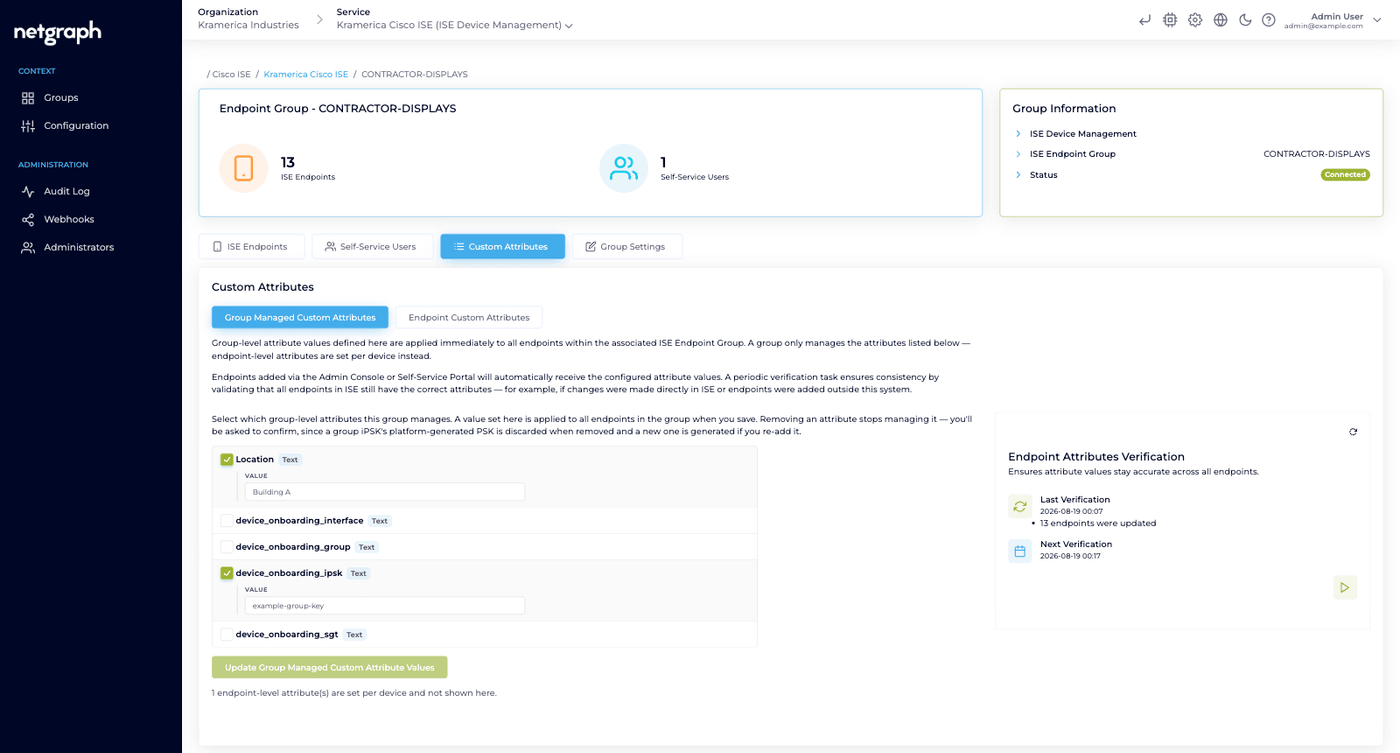
Group Managed Custom Attributes
Section titled “Group Managed Custom Attributes”The sub-tab lists every group level attribute the Context defines, as a checkbox. Tick one and a Value field appears under it, rendered to match the attribute’s input type. Save with Update Group Managed Custom Attribute Values.
An attribute with a value prefix is marked Prefix followed by the prefix in a small tinted box next to its name, and the same box sits in front of its text field, before a toggle’s switch, or before the key on a group PSK. Enter only the value; Cisco ISE stores the prefix and the value together. Copy on a group PSK copies the key alone.
The rule to hold on to: a group manages an attribute if, and only if, it holds a value row for it. An attribute the group hasn’t ticked is left alone on the ISE side, and the platform writes nothing for it. A ticked attribute with an empty value is different: that is an instruction to actively manage the attribute as empty.
Saving applies the value to every endpoint in the group, both the ones already there and the ones added later. The panel says so:
Group-level attribute values defined here are applied immediately to all endpoints within the associated ISE Endpoint Group.
Un-ticking an attribute stops the group managing it. You are asked to confirm, because for a key attribute the platform-generated key is discarded at the same time. See Identity PSK.
Drift correction
Section titled “Drift correction”A periodic verification task compares the endpoints in Cisco ISE against the group’s values and corrects the ones that no longer match — an endpoint edited directly in ISE, or one that arrived through some other route. You never trigger it by hand.
It covers group level values only. Endpoint level values are outside its scope entirely, so a per-device asset ID or key is never overwritten by it. The one thing it does rewrite at endpoint level is the storage format, after an attribute’s value prefix has been set, changed or removed; the value itself stays as it was.
Example: per-group vendor ownership
Section titled “Example: per-group vendor ownership”Context-level definitions, both at group level:
| Attribute Name | ISE Type |
|---|---|
vendor-owner | String |
maintenance-window | String |
Values on the IP_Phones group:
| Attribute Name | Value |
|---|---|
vendor-owner | Acme Telephony |
maintenance-window | Sat 02:00–04:00 UTC |
Result: every endpoint in IP_Phones carries both values on the
ISE side, available to your ISE authorization policy, reports, or
SIEM pipelines.
Endpoint Custom Attributes
Section titled “Endpoint Custom Attributes”The other sub-tab is an opt-in list, not a value editor. Tick the endpoint level attributes this group’s devices should carry, and save with Update Endpoint Custom Attributes. Values are entered per device afterwards, see Managing endpoints.
Only the attributes you tick here appear in the device forms, in the admin console and in the Self-Service portal, and only those are validated, required, or generated for this group’s devices. A new group starts with Device Type ticked and nothing else.
Each row carries badges showing its input type, whether it is Editable or Display in Self-Service, and an asterisk if it is Required. A prefixed attribute also shows Prefix and its boxed prefix here, so a reader knows what Cisco ISE will store in front of each device’s value.
Note
Un-ticking is not deleting. The panel is explicit: “Deselecting an attribute does not remove values already stored in ISE.” The platform stops managing the attribute for this group; whatever was already written stays on the endpoints.
Seeing the values at a glance
Section titled “Seeing the values at a glance”You don’t have to open a device to see what it carries. In the group’s ISE Endpoints list, the Description column shows a small badge with the number of attributes that have a value on that endpoint. Hovering it, or reaching it with the keyboard, opens a Custom attributes popover listing each one as label and value, in the order the Context defines them, with dropdown values shown as their description and prefixed values shown without their prefix.
Platform attributes are left out of it, and Device Type has its own column. The popover is an admin-console convenience; the Self-Service portal shows attribute values inside each device instead.
What batch upload does and doesn’t carry
Section titled “What batch upload does and doesn’t carry”Batch upload takes MAC address, description and an optional device type. Endpoint level attributes are not part of the file. Import the endpoints first, then set their values on each device.
Group level values need no special handling: an imported endpoint picks up the group’s values the same way any other endpoint does. A key attribute set to generate automatically still produces a key for every imported device, readable afterwards from the device.