
Managed Attributes
Define which Cisco ISE Endpoint Custom Attributes the platform manages, at group level or endpoint level. The definition grammar, the input types, and what end users get to see.
Managed Attributes are how Endpoint Manager for Cisco ISE handles Cisco ISE’s Endpoint Custom Attributes — the arbitrary fields your ISE deployment can expose for authorization, audit, or reporting.
This page covers the definitions: what an attribute is and how you create one. Setting values is a separate job on the group, see Attribute values on a group. Attributes that hold a Wi-Fi key have their own page, Identity PSK.
Two levels
Section titled “Two levels”Every attribute is defined at one of two levels, and the level decides where its value lives.
| Level | Value set | Suits |
|---|---|---|
| Group Level | Once on the group, applied to every endpoint in it | Data that is uniform across the group: vendor ownership, site code, a policy tag, a maintenance window |
| Endpoint Level | On each device, when it is added or edited | Data that differs per device: asset ID, end date, owner, a device key |
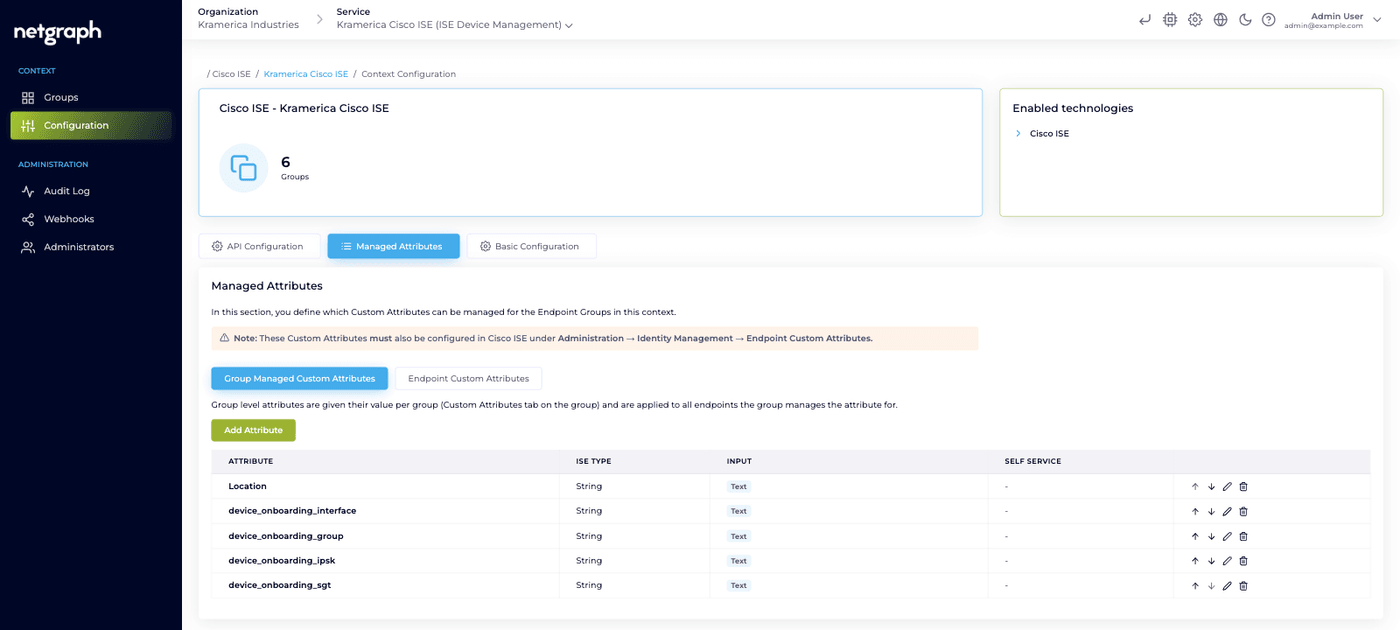
The level is decided by which sub-tab you create the attribute from, and it is locked afterwards. The edit dialog shows it as a read-only Attribute Level field with the note “The level cannot be changed — remove the attribute and add it again.”
So an attribute is group managed or endpoint managed, never both. There is no override relationship between the levels and no case where a group value and an endpoint value compete for the same field. A group can manage any number of attributes at each level at the same time; the only either-or rule concerns Identity PSK.
Prerequisite — the attribute must exist in Cisco ISE first
Section titled “Prerequisite — the attribute must exist in Cisco ISE first”Every attribute you define must already exist as an Endpoint Custom Attribute on your Cisco ISE deployment, under Administration → Identity Management → Endpoint Custom Attributes. The platform never creates it there.
Warning
Cisco ISE discards values for names it does not recognise, and returns no error while doing it. An attribute whose name does not match one on the ISE side will save on the platform, look correct in every view, and never reach the endpoint. Check the spelling against Cisco ISE before you rely on a value.
Defining an attribute
Section titled “Defining an attribute”Open the Context’s Configuration → Managed Attributes tab and pick the sub-tab for the level you want: Group Managed Custom Attributes or Endpoint Custom Attributes. Press Add Attribute there. The form has three sections, and a String attribute gets a fourth, optional one: a value prefix, shown under Value Format on an iPSK PSK attribute and folded away behind an Advanced link on any other.
Identity
Section titled “Identity”-
Attribute Name
Exactly as it is spelled on the Cisco ISE side. Must start with a letter, may contain letters, digits, underscores and hyphens, and may be up to 64 characters. Unique within the Context, and immutable once created.
Names beginning with
ngare reserved for platform attributes and are rejected. That reservation concerns the attribute’s name. The optional value prefix further down the form is a different thing: text Cisco ISE stores in front of each value. -
ISE Type
Must match the type defined in ISE, and is immutable once created:
- String — any text value.
- Integer — whole number.
- Boolean —
true/false. - Float — decimal number.
- Long — big whole number.
- IP Address — IPv4. IPv6 addresses are rejected.
- Date — a date, with no time of day.
-
Display Name
Optional. Shown to readers instead of the raw attribute name, so
asset-idcan appear as Asset ID.This is the only label field. There is no free-text description on an attribute; descriptions live on the individual options of a dropdown.
Behavior
Section titled “Behavior”Input decides the control a person gets, which is not the same thing as the ISE type. A field can be stored as a String in Cisco ISE and still be presented as a dropdown of four approved values.
| Input | What the user gets |
|---|---|
| Text | Free text |
| Integer | Whole number |
| Decimal | Decimal number |
| Toggle | An on/off switch, stored as true / false |
| IP Address | An IPv4 field |
| Date | A date picker, date only |
| Dropdown | A list of values you define |
| iPSK PSK | A Wi-Fi key the platform generates and rotates |
Not every pairing is valid. The ISE type constrains the inputs:
| ISE Type | Inputs allowed |
|---|---|
| String | All eight |
| Integer, Long | Text, Integer, Dropdown |
| Float | Text, Decimal, Dropdown |
| Boolean | Text, Toggle |
| IP Address | Text, IP Address, Dropdown |
| Date | Text, Date, Dropdown |
An iPSK PSK attribute must be typed String in Cisco ISE.
Required makes a value mandatory when a device is added. It is available on endpoint level attributes only, and never on a Toggle, which always carries a value, nor on a key, which the platform generates.
Note
Batch upload cannot carry attribute values. If a group uses batch adding, don’t mark its endpoint attributes Required.
Exposure
Section titled “Exposure”Exposure decides what a Self-Service User sees. The attribute is always visible to you in the admin console regardless of this setting.
| Setting | In the Self-Service portal |
|---|---|
| None | Not shown. Admin-only |
| Display | The value is visible on the user’s devices, read-only |
| Editable | The user can also set the value when adding or editing their own devices |
Editable requires an endpoint level attribute. On a group level attribute the option is disabled, with the note “Requires an endpoint level attribute — group level values are managed by admins.”
Two things must both be true before a Self-Service User sees an endpoint attribute: exposure is not None, and the group has opted in to the attribute.
Value prefix
Section titled “Value prefix”Optional, and only for attributes typed String in Cisco ISE. It
is never offered on a system attribute such as Device Type. On an
iPSK PSK attribute the field sits in plain view under the heading
Value Format; on every other String attribute it is behind an
Advanced link. The field is labelled Value Prefix:, and a new
iPSK PSK attribute arrives with psk= already filled in. The help
text for a key states the reason:
Stored in Cisco ISE in front of each PSK. An iPSK authorization profile uses the attribute as is, so it must hold psk=<key>. Admins and end users enter only the key.
A prefix is text Cisco ISE stores in front of each value. With the
prefix psk=, a key entered as MyKey is stored as psk=MyKey.
Administrators and Self-Service Users enter and see only the value or
key. In the admin console the prefix appears in its own small tinted
box in front of the field or the value wherever a prefixed attribute
shows up, and the Managed Attributes list marks the row with
Prefix followed by the boxed text. The Self-Service portal shows
the plain value and no prefix at all.
The rules:
- At most 32 characters of printable ASCII, with no leading or trailing space.
- Must end with a separator character such as
=or:. - Nothing a person types is interpreted. Typing
psk=abcinto a prefixed attribute storespsk=psk=abc. The same holds for a key entered through Use the group’s existing PSK. - Validation applies to the value alone, so the 8–63 character rule for a key counts the key, not the prefix.
- An empty value is never prefixed.
Setting the prefix needs the same permission as any other change to the Context’s configuration, and the change is audited like the rest of the definition.
Changing the prefix on an existing attribute. A value already in Cisco ISE in an earlier format — written before the attribute had a prefix, or with a previous one — is read with the prefix stripped, so nothing goes missing from any view. When you set, change or remove the prefix, every write from then on uses the current format, and the scheduled group sync rewrites the remaining values of every group that uses the attribute within a few minutes. It changes the format only, never the value. The dialog says so before you save:
Stored values change format
Values already in Cisco ISE are rewritten with the new prefix within a few minutes, for every group that uses the attribute.
Until the sync reaches a device, its endpoint detail page shows the value without the prefix box and with the note “Stored in Cisco ISE in an earlier format. It is rewritten with the current prefix at the next group sync.”
Dropdown options
Section titled “Dropdown options”Press Edit Options on a dropdown attribute. Each option carries a Value, a Description and an optional Icon. The dialog states the split plainly: “The stored value is exactly what is written to Cisco ISE — the description is what the user sees.”
That lets the stored value stay machine-friendly while the reader gets something meaningful. Values must be unique, non-empty and valid for the ISE type, and they are matched exactly, including case.
Device Type — the one system attribute
Section titled “Device Type — the one system attribute”The platform seeds a single system attribute into every Context: Device Type, an endpoint level dropdown with a curated list of options and icons, Editable in Self-Service, and pre-selected on every group.
Device type used to be a fixed field in both portals. It is now an ordinary endpoint attribute driven by this definition, which is also why the icons in device lists come from the attribute’s options.
Its name, ISE type, level and input are fixed and it cannot be
removed. Its options, its Required flag, its Display Name and its
Self Service setting are yours to change. The ng prefix
reservation exists so your own attributes can never collide with a
platform one.
Which groups use a definition
Section titled “Which groups use a definition”Both sub-tabs carry a Used by column. It reads 1 group, N groups, or Not used. Click the count and the row expands into a list of the group names, 25 at a time with a Show more control. For an administrator who may manage groups, each name links straight to that group’s Custom Attributes tab; anyone else sees plain names.
What counts as using follows the level, with the same rule as on the group’s own tab: a group uses a group level attribute when it holds a value row for it, and an endpoint level attribute when it has ticked it in the opt-in list. The summary line above the names says it the same way — “N groups set a value for X” at group level, “N groups use X for their endpoints” at endpoint level, and “No group sets a value for X” or “No group uses X for its endpoints” when there is none.
The list shows names only. It never reveals attribute values or keys.
Removing a definition
Section titled “Removing a definition”Remove an attribute with the action on its row. A definition still in use by a group is refused until you remove it from the groups first; the Used by column tells you which ones. The system attribute cannot be removed at all.
Removing a definition stops the platform managing that attribute going forward. It does not clear the values previously written into ISE — the confirmation dialog says so.
Common attribute shapes
Section titled “Common attribute shapes”| Attribute | Level | Input | Purpose |
|---|---|---|---|
vendor-owner | Group | Text | Name of the vendor managing the fleet; read by reports and SIEM |
maintenance-window | Group | Text | When it’s OK to reboot or re-configure |
security-group-tag | Group | Dropdown | SGT name ISE applies; drives microsegmentation |
asset-id | Endpoint | Text | The asset register’s identifier for this specific device |
end-date | Endpoint | Date | When the device should stop being allowed on |
owner | Endpoint | Text | Who is responsible for this device |
vlan-id | Either | Integer or Dropdown | VLAN assignment for MAB authorisation |
Note
The platform never acts on a value. An end-date attribute
expires nothing by itself. It becomes meaningful only through an
authorization rule you write in Cisco ISE, for example one that
admits a device only while its end date is in the future. The
platform’s job is to keep the value accurate and in the right
place.