
Change of Authorization
Trigger a CoA on a live endpoint to force Cisco ISE to re-evaluate its authorization policy — typically after a group move or an attribute change.
Change of Authorization (CoA) asks Cisco ISE to re- authenticate an endpoint that’s currently online. ISE re-runs the authorization rules with whatever is now true about the endpoint — its group membership and its custom attribute values — and sends the appropriate Access-Accept / Access-Reject / RADIUS changes back to the NAS.
Endpoint Manager exposes Perform CoA on online endpoints so you don’t have to dip into Cisco ISE’s admin UI every time a per-endpoint change should take effect immediately.
The one CoA you don’t ask for
Section titled “The one CoA you don’t ask for”Updating or regenerating an Identity PSK fires a CoA by itself: the whole group for a shared key, that one device for a per-device key. It’s deliberate. Without it the old key would keep working until the device happened to re-authenticate, which defeats the point of rotating it.
Everywhere else, CoA is something you trigger.
When to use CoA
Section titled “When to use CoA”Typical moments to trigger CoA:
- After a group move. You moved an endpoint from one managed group to another and the authorization profile depends on the group.
- After an attribute change. You updated
vendor-owner,vlan-id,security-group-tag, or any other Managed Attribute your policy consumes, and want the change to take effect on the endpoint’s current session instead of at its next re-auth. - During incident response. You want to kick an endpoint off the network right now — for example, after revoking its access in a group. CoA re-runs the policy, which will deny the authorization if the endpoint’s new state no longer matches.
If the change can wait until the endpoint next authenticates (typical EAP-TLS re-auth intervals are minutes to hours), you don’t need a CoA. ISE will pick up the new state on its own.
Triggering CoA
Section titled “Triggering CoA”From the group’s ISE Endpoints tab:
-
Find the online endpoint
Only online endpoints — those with a live Cisco ISE session — are eligible for CoA. The endpoint’s Status icon shows online state; offline endpoints don’t have a session to re-authenticate.
-
Open the row action menu
The three-dot menu at the end of the row.
-
Click Perform CoA
The item only appears when the endpoint is online. If the endpoint’s session has dropped since the list loaded, the item is hidden.
-
Confirm
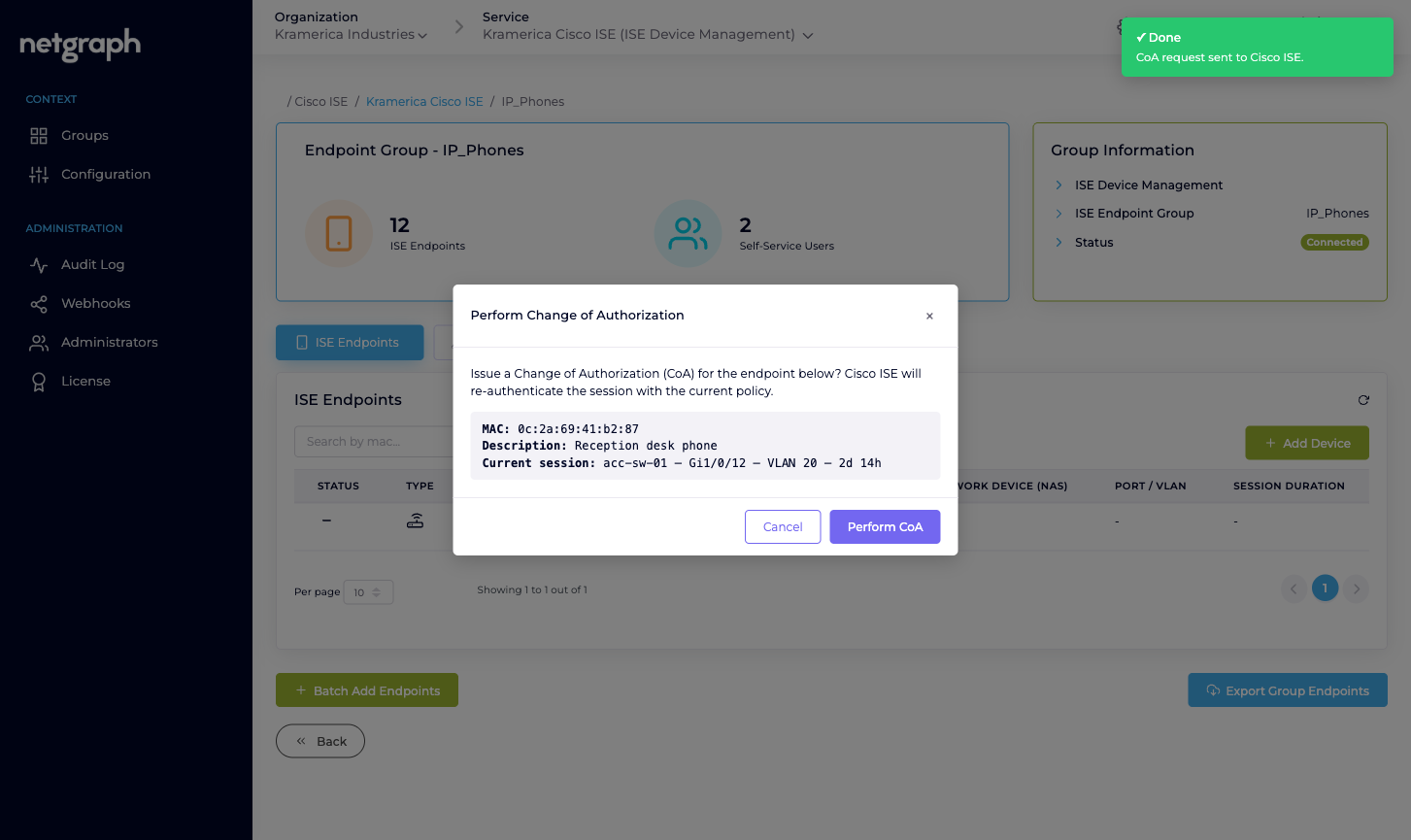
A confirmation dialog appears. Click through it.
The platform asks Cisco ISE’s Monitoring API to issue a reauth CoA for the MAC. ISE sends RADIUS CoA to the NAS the endpoint is authenticated against, the NAS re-authenticates the endpoint, and ISE returns the new authorization. The operation is synchronous from your point of view — you see a success toast once the CoA has been issued.
What success means
Section titled “What success means”A success toast confirms that ISE accepted the CoA request and forwarded it to the NAS. It doesn’t guarantee the endpoint stayed online or got the new authorization:
- If the NAS is reachable and accepts CoA, the endpoint re-authenticates and picks up the new policy decision.
- If the NAS is unreachable, rejects CoA, or drops the endpoint during re-auth, the endpoint’s session is ended. Whether it reconnects depends on the endpoint and the NAS’s rules.
Use ISE’s own Live Sessions view to confirm the final state, or re-open the endpoint’s detail page in Endpoint Manager — the Session Details card refreshes live.
Failure paths
Section titled “Failure paths”A few things can block CoA:
- The endpoint is offline. No active session means the Monitoring API has nothing to re-authenticate. Wait for the endpoint to come back online, then retry.
- The MAC has no recent session data. Sometimes ISE caches sessions briefly; an endpoint that just dropped may look online in the list but not have the session data required to issue CoA. ISE responds with a specific error which the platform surfaces as an error toast.
- The NAS isn’t reachable or doesn’t accept CoA from this ISE. Cisco ISE responds with a failure; the platform shows an error toast and the session stays unchanged.
- The Monitoring API isn’t enabled on your ISE. If the Cisco ISE API Status table shows Monitoring API Down, CoA won’t work at all — it depends on that API family. See Cisco ISE connection.
Self-Service users cannot issue CoA
Section titled “Self-Service users cannot issue CoA”Perform CoA is an admin-side action only. Delegated administrators in the Self-Service portal cannot trigger CoA on their endpoints — they can Modify (which updates attributes) and Revoke (which removes the endpoint from the group), but enforcing the change on live sessions stays with the Organization admin.
Audits
Section titled “Audits”Every CoA trigger is recorded in the Context’s Audit Log:
who issued it, against which endpoint, with which result. It
also publishes as part of the ise.configuration.audit webhook
stream if you have a webhook subscribed. See
Audit Log and
Webhooks.