
Identity PSK
One shared Wi-Fi key for a whole group, or a unique key on every device. Activation, the existing-fleet choice, rotation, what a Self-Service User sees, and what a per-device key does not give you.
An attribute whose Input is iPSK PSK holds a Wi-Fi pre-shared key that Endpoint Manager for Cisco ISE generates, writes onto the Cisco ISE endpoint record, and rotates on request.
Cisco ISE still serves the key and still makes every authorization decision. What the platform adds is maintenance of the value and a way to put it in front of the people who need it, without giving them an ISE login.
Two variants
Section titled “Two variants”The level of the attribute decides the shape of the key. The help text in the form states each one:
| Variant | The form says | Suits |
|---|---|---|
| Group Level | ”One shared PSK for the whole group, generated by the platform when a group adds the attribute.” | A fleet that connects with a single credential: a floor of IP phones, a batch of sensors |
| Endpoint Level | ”A unique PSK per device, generated by the platform.” | Devices you want to be able to revoke one at a time without disturbing the rest |
One key per group
Section titled “One key per group”A group runs either a shared group key or a per-device key, never both, and at most one of either. Tick the wrong one and the checkbox is disabled with an inline hint, and the save is refused with a message that names the reason:
A group can use only one iPSK — this group already manages a group-level iPSK. Remove it before enabling an endpoint-level iPSK.
The rule exists because a device would otherwise have two candidate keys and no way to tell which one applies.
It is a group rule, not a Context rule. A Context may define several key attributes — one per SSID, for instance — and different groups may use different ones. Switching a group from one variant to the other is a matter of un-ticking the first, saving, and ticking the second.
Key format
Section titled “Key format”Between 8 and 63 characters of printable ASCII. Spaces are allowed inside the key but not at the start or the end. Cisco ISE Identity PSK takes a passphrase, so the 64-character hexadecimal raw-key form is not accepted. The limits count the key alone, not the prefix Cisco ISE stores in front of it (next section).
How the key is stored in Cisco ISE
Section titled “How the key is stored in Cisco ISE”A new iPSK PSK attribute is created with the value prefix psk=, so
the endpoint record holds psk= followed by the key — psk=MyKey
for a key of MyKey. That is the form an iPSK authorization profile
expects when it uses the attribute as is, so the profile needs
nothing added to it.
You never type the prefix. Enter only the key, whether the platform
generates one, you press Update PSK, or you choose Use the
group’s existing PSK at activation. What is typed is never
interpreted: entering psk=MyKey stores psk=psk=MyKey.
Wherever a prefixed key is shown in the admin console, the prefix sits in its own small tinted box in front of the key or the input — on the group’s Custom Attributes tab, in the device forms, and in the Device PSK card on the endpoint detail page. Copy copies only the key, which is what a person pastes into a device. The Self-Service portal shows the plain key with no prefix at all.
The prefix is a setting on the attribute definition, under Value Format in the attribute dialog. Changing or clearing it rewrites the stored keys into the new format without changing the keys themselves; see Value prefix.
Activating a shared group key
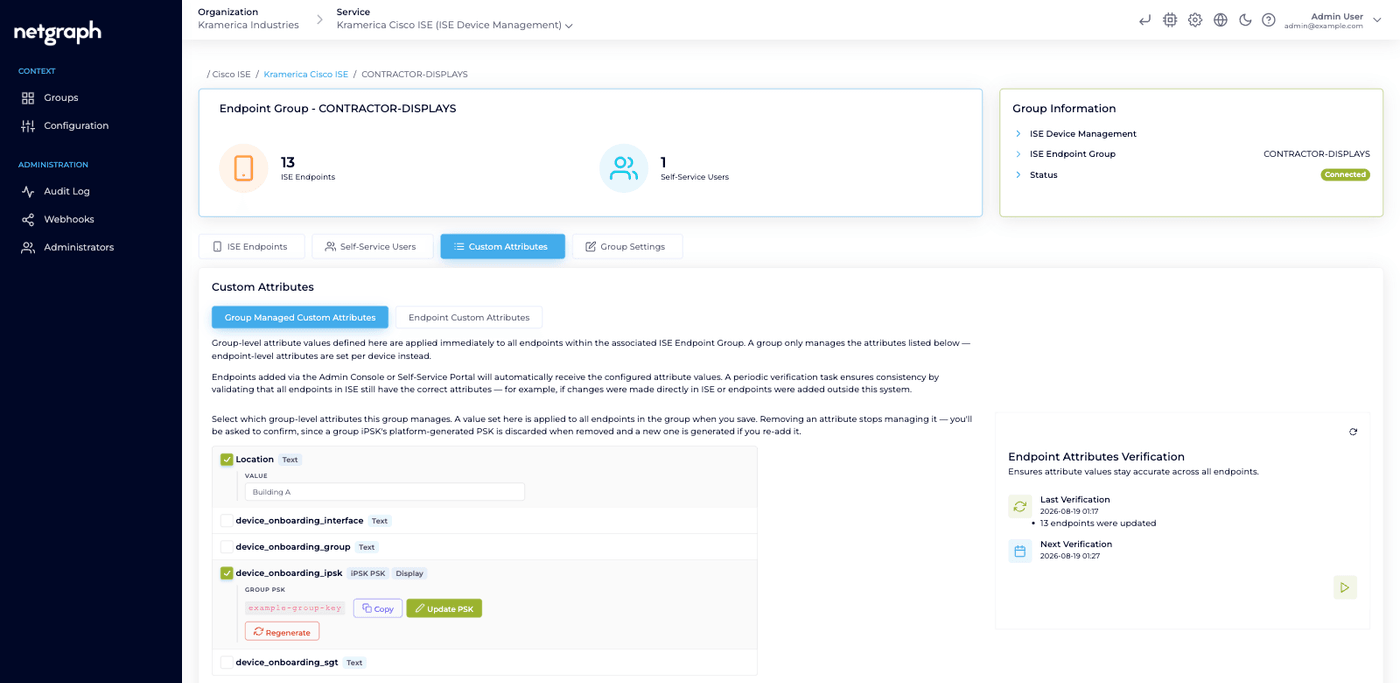
Section titled “Activating a shared group key”Ticking a group level key attribute on a group’s Custom Attributes tab opens the Activate dialog. It saves immediately; cancelling un-ticks the row again. Two decisions live in it.
Wi-Fi SSID. The network this key belongs to. It is shown to Self-Service Users in the connect guide and encoded in the QR code. You can set it later on the group’s Group Settings tab, but the connect guide stays hidden until it exists.
The key itself, where the choice matters:
-
Use the group's existing PSK
“Already have devices in ISE with a PSK? Enter that key so the sync doesn’t overwrite it.”
This is the option for a group whose endpoints are already in Cisco ISE and already connected with a key you know. The platform adopts the key you type instead of inventing one, so the synchronisation leaves the fleet exactly as it is. Enter the key alone, without
psk=; the attribute’s prefix is added when the value is written. -
Generate a new PSK for me
“The platform generates a strong PSK and pushes it to every device in the group.”
The right choice for a group that isn’t carrying a key yet.
Warning
Choosing to generate on a fleet that is already connected replaces the key those devices hold, and they drop off at their next authentication. On an existing deployment, enter the key you already have.
Supplying your own key is available at activation only. After that the key changes through Update PSK and Regenerate instead, and typing into the ordinary value field is refused.
Rotating a key
Section titled “Rotating a key”Both actions do the same two things: rewrite the key on every affected endpoint in Cisco ISE, and trigger a Change of Authorization so the old key stops working immediately rather than at the next natural re-authentication.
- Update PSK — you supply the new key, or press Generate for me inside the dialog.
- Regenerate — the platform creates one straight away.
For a group key that re-authenticates the whole group. For a device key, that one device. This is the one place a CoA happens without you asking for it; everywhere else it is a deliberate action, see Change of Authorization.
Keys on individual devices
Section titled “Keys on individual devices”A per-device key is generated when the device is added, unless the definition has Generate PSK automatically when a device is added switched off. When adding a device the form offers a choice:
- Generate automatically — a unique key is created on add.
- No PSK when adding — set one later from the device.
- Enter PSK manually — “Use the key the device already has, or pick your own.”
The add operation never hands back the key. Read it afterwards from the device: the Device PSK card on the endpoint detail page in the admin console, or the device’s own row in the Self-Service portal.
Adding a MAC address that already exists in Cisco ISE adopts that endpoint into the group. A key it already holds is never silently rotated.
What a Self-Service User sees
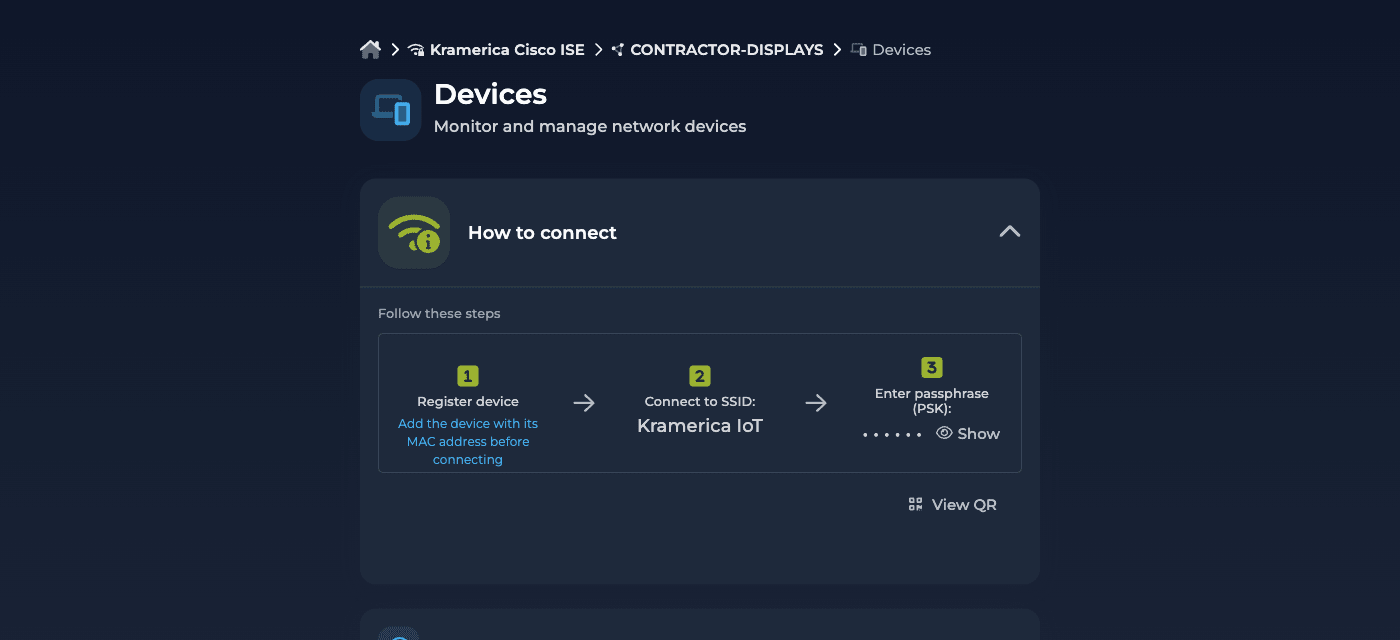
Section titled “What a Self-Service User sees”For a shared group key, a three-step How to connect guide appears above their device list, once the group has both an SSID and a key: register the device, connect to the SSID, enter the passphrase. The key can be revealed, copied, or read as a standard Wi-Fi QR code.
For a device key, each device carries its own key block with a Wi-Fi network line naming the group’s SSID, and compact controls to reveal or hide, copy, show a QR code, update and regenerate.
Revealing and copying need only membership of the group. Setting or regenerating additionally needs the attribute to be Editable and the user to hold the group’s device-administration role.
What a per-device key is, and is not
Section titled “What a per-device key is, and is not”Two things worth stating plainly, because the natural assumption runs the other way.
Keys are shown in clear text to users entitled to the group that holds them. The reveal control is a screen-privacy toggle, not an access control.
Any member of a Self-Service group can see any other member’s device key. That is deliberate: an Endpoint Identity Group is administered collectively and the people in it maintain each other’s devices. A key per device gives you a unique credential you can revoke one device at a time. It does not give one user’s key privacy from another user in the same group. If that separation matters, separate the groups.
Removing the key attribute from a group
Section titled “Removing the key attribute from a group”Warning
Removing a key attribute from a group does not remove the key from the endpoints in Cisco ISE. Those devices keep it and keep connecting, but the platform can no longer show or rotate it.
Adding the attribute back generates a new key rather than recovering the old one, which will disconnect every device still using the previous one.
Not the same as EntryPoint’s iPSK
Section titled “Not the same as EntryPoint’s iPSK”Endpoint Manager maintains the key value on an endpoint record that your Cisco ISE serves. EntryPoint’s iPSK for Cisco Networks is a Netgraph-hosted RADIUS service that serves the key itself to your controllers.
Two Services for two deployment shapes. If Cisco ISE is your RADIUS, this page is the right one.