
Service Gateway overview
Router-based deployment of Sign In on Cisco Catalyst, IOS-XE, or SD-WAN. The Service Gateway routes guest traffic, terminates an IPsec tunnel to Netgraph, and configures the cloud-served DHCP, DNS, and BGP for the context.
The Cisco Service Gateway integration, often abbreviated SG, runs Sign In on a Cisco router using standard routing. The router routes guest traffic, sets up its own FlexVPN tunnel to Netgraph, and tells the platform about its guest networks over BGP inside the tunnel. DHCP and DNS for guests are served from the Netgraph cloud and configured under this integration, with the router relaying guest DHCP toward the platform. The router’s configuration comes from a framework: you download it from Sign In and apply it on the router. Application traffic flowing through the router feeds Application Visibility.
The Service Gateway is a Cisco router (for example ISR 1100/4400 or Catalyst 8000) that connects to the platform over a FlexVPN (IKEv2/IPSec) tunnel. The Captive Portal, DHCP, and DNS are served from the Netgraph cloud, with the router relaying guest DHCP. An unauthenticated guest is steered up to the cloud to sign in; once signed in, the guest's internet traffic breaks out locally at the Service Gateway and does not pass back through the Netgraph cloud.
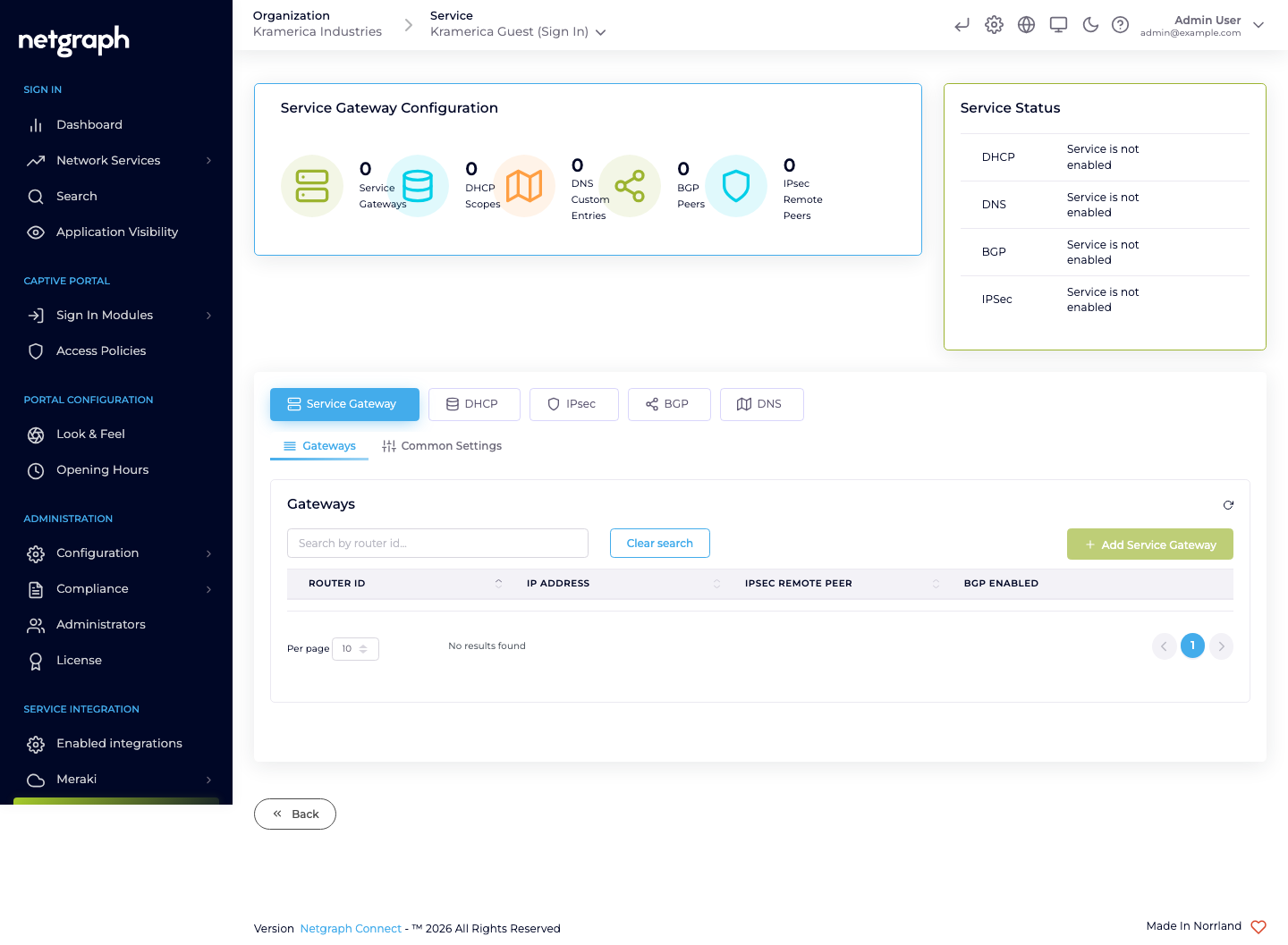
Open Service Integration → Service Gateway in the Context admin to configure everything under this integration. The page has five tabs:
- Service Gateway: the registered routers, plus common settings.
- DHCP: scopes served to guests.
- IPsec: the remote peer for each router’s tunnel.
- BGP: BGP between the routers and the platform.
- DNS: custom DNS entries the Service Gateway serves.
What the integration provides
Section titled “What the integration provides”- Cloud-served DHCP: assign IPs to guests without a separate DHCP server of your own. Scopes are configured under this integration and served from the Netgraph cloud, with the router relaying guest DHCP. Supports multiple scopes for multi-VLAN deployments.
- Cloud-served DNS: resolve names for guests, with optional custom entries configured under this integration.
- A FlexVPN tunnel to Netgraph: carries DHCP relay, DNS, guests on their way to the portal, BGP and statistics. Signed-in guests break out locally.
- BGP inside the tunnel: the router advertises its guest networks to the platform.
- Router configuration from a framework: download the resolved configuration for each router and apply it on the router.
- Deep-packet-inspection data: the source of Application Visibility.
When to choose Service Gateway
Section titled “When to choose Service Gateway”- The venue runs Cisco routing (Catalyst, IOS-XE, SD-WAN / Viptela).
- You want Application Visibility.
- You want platform-managed DHCP/DNS for guests instead of depending on the wider network.
- You need multiple Service Gateways per Context.
For pure Meraki deployments, Cisco Meraki is usually simpler.
Status card
Section titled “Status card”The Service Gateway page shows a Service Status card for each of DHCP, DNS, BGP, and IPsec, indicating whether the service is currently enabled for the context. A green check means the service is configured and active for the context; a greyed “Service is not enabled” means the corresponding tab has no configuration.
Site matching
Section titled “Site matching”Sign In identifies a guest’s site by the DHCP scope that allocated their address on Service Gateway deployments. Each DHCP scope carries a Connected to Site link, and the set of scopes bound to a Site defines which leases belong to that Site. Configure sites and their member scopes under Site-based redirects.
Multiple Service Gateways
Section titled “Multiple Service Gateways”A single Sign-In Context can have multiple Service Gateways — useful for high-availability pairs, multi-site deployments, or geo-distributed venues that share one Context. See Gateways for how to register additional routers.